
Threat Profiles Dashboard
Learn how to navigate Validin's Threat Profiles Dashboard, and search the platform for distinct threat actor activity.
Validin aggregates IOCs and intelligence from malware feeds, DNS telemetry, OSINT sources, and infrastructure scanning, and makes this information available in Threat Profiles.
Data sourcesThreat Profiles are built from multiple intelligence sources, including DNS telemetry, OSINT feeds, and threat research databases such as:
The Threat Profiles Dashboard is a landing page that displays known threat actors and malware families, including the infrastructure they operate.
Threat Profiles enable you to:
- Identify active and emerging threat groups
- Investigate infrastructure associated with a threat actor
- Track newly added indicators and research reports
- Pivot into detailed DNS and reputation data
Search and filter threat profiles
- Enter a keyword in the Search bar using the following categories:
- Threat actor or alias (e.g.
lazarus) - Target
- Country of origin
- Description
- Threat actor or alias (e.g.
- Select one or more category filters:
- Malicious
- Malware
- Suspicious
- Review the filtered list of threat profiles that match your criteria below
Sorting and navigation
Sort returned Threat Profiles using the drop down menu below the search box:
- Most recently updated
- Most references
- Most infrastructure
- Alphabetical
Use pagination controls to browse long result sets.
Navigating the dashboard
Returned Threat Profile data is displayed across three key areas:
- Threat Profile cards
- Recently Added Indicators
- Recent Open Source Reports
1. Threat Profile cards
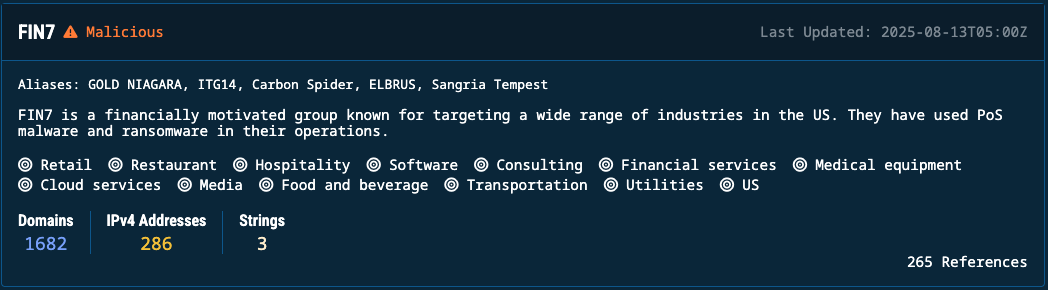
Threat profile cards display:
- Profile name and category: Threat group or malware family and its classification
- Description: Summary of known behavior and capability
- Attack vector: Operational context, including industries, platforms and Operating Systems targeted
- Domains: Count of domains attributed to the threat
- IPv4 addresses: Observed IP infrastructure
- Strings: Identifiers and extracted signatures
- Last updated: Timestamp of latest indicator addition
- References: Count of supporting OSINT sources
NoteThreat profiles without descriptions are sourced directly from OSINT providers, and have not yet been categorized or enriched by the Validin team.
Select any card to open a full profile, including DNS history, metadata, and reputation.
2. Recently Added Indicators
This panel lists newly discovered or newly attributed indicators.
| Column | Description |
|---|---|
| Key | Indicator (domain or IP) recently linked to a threat |
| Date added | When Validin first recorded the association |
| Threat Actor | Profile the indicator belongs to |
Click an indicator to run a Core Search and gather additional intelligence.
Click a Threat Actor to open its corresponding Profile page.
3. Recent Open Source Reports
This section lists the latest OSINT intelligence integrated into threat profiles.
Each entry includes:
| Item | Description |
|---|---|
| Reference | Source of the report or feed entry |
| Date added | When the report was processed |
| Threat actor | Profile associated with new indicators |
Use this to monitor active research coverage of threat groups.
Click a reference to open the threat report in a different browser tab.
Click a Threat Actor to open its corresponding Profile page.
Updated 8 months ago