
Alerts
Track key infrastructure changes in threat investigations.
Alerts notify you when tracked indicators show evidence of change in DNS, HTTP behavior, registration records, or OSINT observations, allowing analysts to detect infrastructure shifts that may signal active campaigns or adversary operations.
Alerts appear in the Alerts tab of a Project.
How alerts are generated
Alerts require the Track Changes slider to be enabled for any indicator that's part of a Project.
When a selected attribute changes based on new network telemetry or intelligence ingestion, Validin creates an alert.
Track Changes can be used to monitor:
- Newly observed infrastructure
- Hosting or registration modifications
- SSL certificate updates
- HTTP response fingerprint changes
- Subdomain additions
Alerts tab
The Alerts tab lists change-driven events for the given Project across the following fields:
| Column | Description |
|---|---|
| Key | Indicator that triggered the alert |
| Category | Attribute group where the change occurred |
| Value | Attribute value that changed (example: HOST-BANNER_0_HASH) |
| First Seen | Timestamp of the initial observation |
| Last Seen | Most recent observation of the change |
| Alert Time | When the alert was generated |
| Change | Classification of the event (example: newly_observed) |
Click on an indicator's value to execute a Core Search.
Use Export to download alert data for SOC or CTI workflows, as a JSON or CSV.
Change tracking configuration
Tracking behavior can be configured in two ways:
- Per indicator in the Indicators tab:
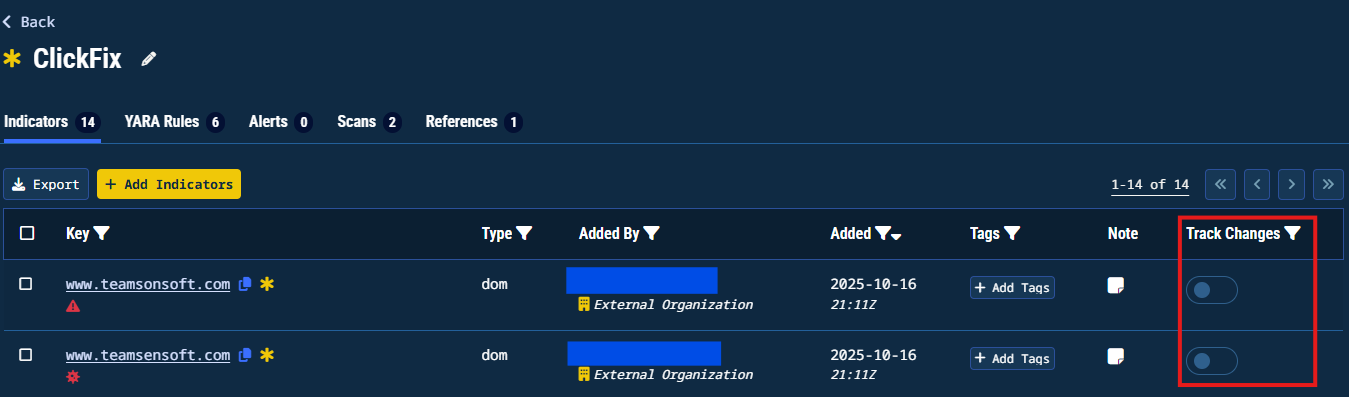
Track Changes slideout
- Per Project using the Automatically Track Changes for newly added IOCs toggle in Settings > Alert Settings.
Tracked attribute categories include:
| Category | Trackable Attributes |
|---|---|
| DNS | A, AAAA, NS, TXT, SOA, PTR, CNAME, HTTPS, CAA, MX, SRV |
| Host Responses | META, TITLE, SERVER, JARM, BANNER, ETAG, ADSYS_ID, GTAG_ID, HEADER_HASH, FAVICON_HASH, CLASS_0_HASH, CLASS_1_HASH, LOCATION_DOMAIN, BODY_SHA1, CERT_FINGERPRINT_SHA256, CERT_DOMAIN, CERT_CN, CERT_O, CERT_I, CERT_ISSUER, CERT_NOT_BEFORE, CERT_NOT_AFTER, CERT_ST, META_LINKS, IFRAMES_LINKS, ANCHORS_LINKS, LAST_MODIFIED |
| Registration | REGISTRAR, NAMESERVER, REGISTER_TIME, EXPIRE_TIME, TRANSFER_TIME, DELETION_TIME, CHANGE_TIME, STATE, POSTALCODE, COUNTRY, NAME, ORG, PHONE, STREET, CITY, EMAIL, SOFT_EXPIRE_TIME |
| OSINT | Newly Observed Only |
| Subdomains | Newly Observed Only |
Tracking tips
- To keep within your usage quotas, enable Track Changes only on attributes relevant to your objectives
- Use Select All or Exclude All to adjust tracking scope quickly.
Troubleshooting
| Issue | Likely Cause | Resolution |
|---|---|---|
| No alerts generated | Track Changes disabled | Enable Track Changes on relevant indicators or enable automatic tracking |
| High alert volume | Too many attribute types monitored | Reduce scope to high-value attributes |
| Duplicate alerts | Repeated telemetry ingestion | Verify First Seen and Last Seen timestamps to confirm true change |
Updated 10 months ago