
Vertex Synapse
Integrate Validin's passive DNS, WHOIS/RDAP, Certificates, and HTTP/S data into the Synapse hypergraph for advanced threat hunting.
The SentinelOne Validin Power-Up connects a Vertex Synapse instance to the Validin API. It allows you to query Validin data sources - including passive DNS, HTTP crawl data, WHOIS records, and TLS certificates - and ingest them directly into the Synapse hypergraph.
What is Synapse?Synapse is an intelligence analysis platform from the Vertex Project that represents data as a hypergraph. This integration maps Validin data to Synapse nodes such as
inet:fqdn(domains),inet:whois:rec(WHOIS records), andinet:http:request(web requests).
1. Prerequisites ⚙️
To use this Power-Up, ensure your environment meets the requirements for your chosen installation method.
For manual installation:
- Synapse Cortex version
2.144.0or higher. - A Validin API key with access enabled.
- Outbound HTTPS access to
api.validin.com.
For Docker quick start:
- Install the core runtime for your OS.
- Verify the plugin is installed (or use Docker Desktop).
- Ensure the Docker daemon is active.
For more information:
2. Installation 🚀
Choose the installation method that matches your environment.
Quick start: Docker Compose
For a minimal working example, you can run the Power-Up in a containerized environment without setting up a full Cortex manually.
Runtime ConstraintsThe minimal runtime setup does not include Synapse Axon (blob storage) or FileParser. Whilst you can perform enrichments, commands requiring file downloads or parsing will not function in this mode.
1. Launch the environment
Clone the repository and use docker compose to start a Storm shell with the Power-Up pre-loaded.
# Clone the repository
git clone [https://github.com/SentineLabs/sentinelone-validin.git](https://github.com/SentineLabs/sentinelone-validin.git)
cd sentinelone-validin

# Run the minimal runtime environment
docker compose run --rm storm
2. Configure and test
Once the Storm shell (storm>) loads, configure your API key and run a test query.
// Set your API key
storm> s1.validin.setup.apikey <YOUR_VALIDIN_API_KEY>

// Run a test enrichment
storm> [inet:fqdn=example.com] | s1.validin.dns
Manual installation
If you are installing into an existing production Cortex, follow these steps:
1. Load the package
Clone the repository and load the YAML package into your Cortex:
git clone [https://github.com/SentineLabs/sentinelone-validin.git](https://github.com/SentineLabs/sentinelone-validin.git)Run the following command in your Storm shell:
// Load the package configuration
storm> pkg.load --path ./sentinelone-validin/s1-validin.yaml
2. Set the API key
Store your Validin API key in the Cortex configuration:
storm> s1.validin.setup.apikey <YOUR_VALIDIN_API_KEY>3. Performance implications 📊
To optimize your investigation speed and API usage, consider the following strategies when running enrichments.
API Rate LimitsBulk enrichment commands (
s1.validin.enrich) consume API quota rapidly. Verify your plan limits before you script automated workflows.
API quota strategy
Validin APIs are metered. The s1.validin.enrich command is a "convenience wrapper" that executes four separate API calls (DNS, WHOIS, HTTP, Certs) for every single input node.
- High cost:
inet:fqdn | s1.validin.enrich(consumes 4 credits per domain). - Low cost:
inet:fqdn | s1.validin.dns(consumes 1 credit per domain).
Use s1.validin.enrich only on highly suspicious "seed" indicators. For bulk processing of related infrastructure (e.g., 1,000 domains found via a pivot), stick to targeted commands like s1.validin.dns to conserve quota.
Batch vs. single enrichment
Storm automatically batches requests where possible, so make sure your inputs are filtered correctly to avoid "over-enriching" benign data.
- Inefficient (wastes quota): Enriching every domain in your graph, including benign ones like
google.com.
// Suboptimal enrichment
inet:fqdn | s1.validin.enrich- Efficient (saves quota): Filtering for a specific campaign tag before enriching:
// Optimal enrichment
inet:fqdn#campaign.2024.laundrybear | s1.validin.enrich
4. Command references & features 💡
The package adds the following commands to the Storm query language:
| Command | Description | Key options |
|---|---|---|
s1.validin.enrich | Runs DNS, WHOIS, Certificate, and HTTP enrichment in parallel to build a full graph from a single indicator. | --wildcard (includes subdomains) |
s1.validin.dns | Retrieves passive DNS history for a domain or IP. | --first-seen, --last-seen |
s1.validin.http | Retrieves HTTP crawl fingerprints (hashes/headers). | --yield (streams output nodes) |
s1.validin.http.pivot | Pivots from an artifact hash to related infrastructure. Supports specific fingerprint categories (see below). | --dry-run, --category |
s1.validin.whois | Ingests historical WHOIS records and registrar data. | None |
s1.validin.certs | Ingests SSL certificates from Certificate Transparency logs. | --wildcard |
s1.validin.download | Downloads raw file content (HTML/Certs) to Axon. | Requires synapse-axon |
Multi-source comprehensive enrichment
The s1.validin.enrich command serves as a unified entry point. Rather than running separate commands for DNS history, HTTP crawls, certificates, and WHOIS records, this single command executes comprehensive enrichment across all four datasets simultaneously.
// Enrich a domain with DNS, HTTP, WHOIS, and Certs simultaneously
inet:fqdn=<target domain> | s1.validin.enrich --wildcard
Passive DNS & domain enrichment
The s1.validin.dns command retrieves historical DNS records (A, AAAA, NS, MX, TXT).
Wildcard winsUsing the
--wildcardflag returns records for the domain and all subdomains. This is powerful for mapping the full infrastructure scope from a single indicator, but be careful with high-traffic domains.
// Enrich the domain with its registration information, and also include subdomains
[inet:fqdn=<target domain>] | s1.validin.dns --wildcard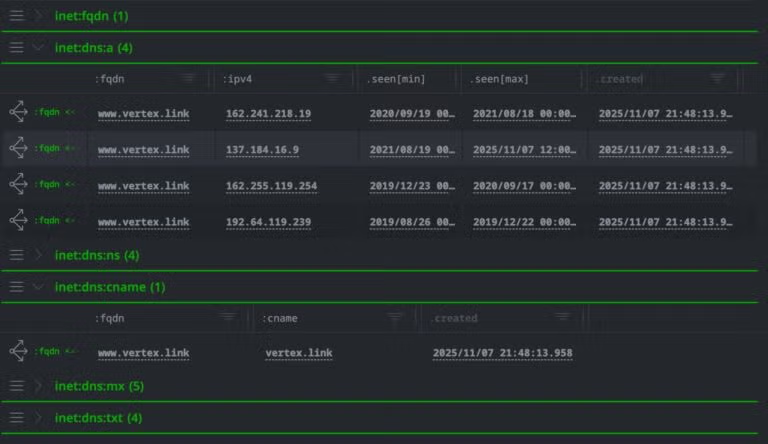
Validin’s historical DNS records showing the observation period in the .seen property
Certificate transparency
The s1.validin.certs command queries Certificate Transparency (CT) logs. Certificates often include Subject Alternative Name (SAN) fields, which Validin parses to find other domains hosted on the same SSL infrastructure.
// Find all domains that share certificates with our target
inet:fqdn=<target domain> | s1.validin.certs --wildcard --yield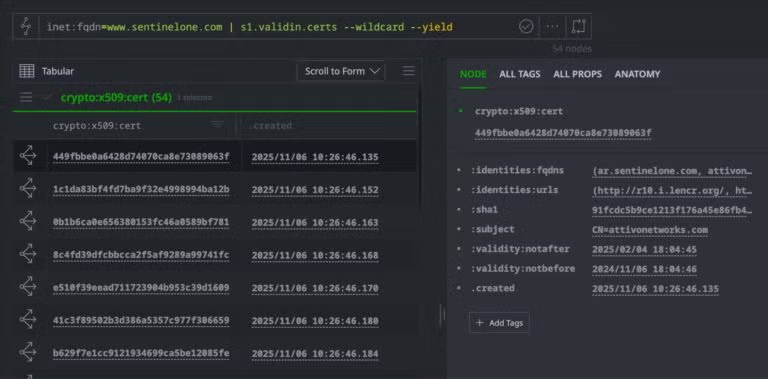
Parsed CT stream history
WHOIS enrichment
The s1.validin.whois command ingests historical WHOIS registration data. This allows analysts to track changes in infrastructure over time (e.g., detecting when a domain was transferred to a new registrar).
// Enrich the domain with historical WHOIS records
inet:fqdn=<target domain> | s1.validin.whois
Host response fingerprinting
Validin's crawler fingerprints web server responses. The s1.validin.http command extracts these fingerprints to identify server configuration and content.
// Retrieve HTTP crawl data (headers, banners, hashes) for a host
inet:fqdn=<target domain> | s1.validin.http --yield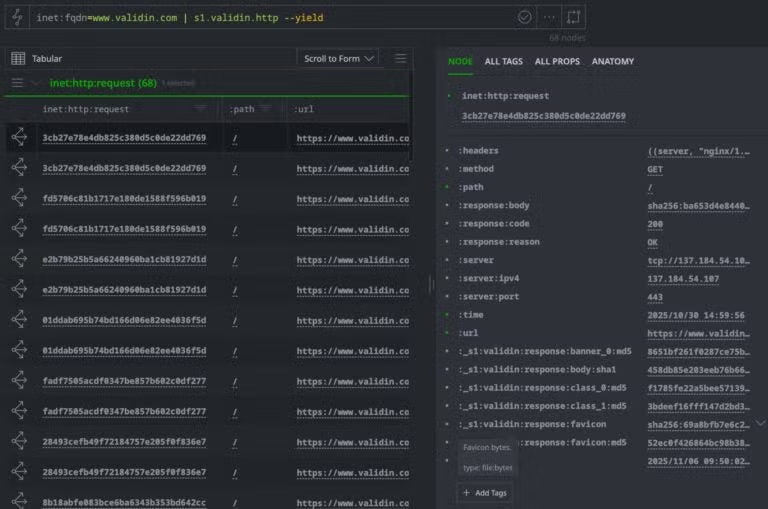
Domain enriched by HTTP crawler data
The crawler extracts:
- Favicon hashes (MD5) – Often forgotten when templating infrastructure
- Body hashes (SHA1) – Detect identical or templated page content
- Banner hashes – Fingerprint server software and configuration
- Header hashes – Identify shared backend infrastructure
- HTML class hashes – Cluster pages with similar structure
Hash-based pivoting
Traditional graph investigation requires ingesting nodes before analyzing them. Validin's Hash Pivot workflow allows for "Dry Run" analysis using specific fingerprint categories.
Dry RunAlways use
--dry-runwhen pivoting on hashes (s1.validin.http.pivot). Pivoting on a common hash (like a standard Apache favicon) can return tens of thousands of results, which will flood your graph and deplete your API quota.High Count (>1000): Likely benign/CDN
Low Count (5-50): Likely a coordinated threat campaign.
When using s1.validin.http.pivot, you can target specific fingerprint types using (--category)
| Category Constant | Description |
|---|---|
FAVICON_HASH | MD5 hash of the favicon image. |
BODY_SHA1 | SHA1 hash of the HTTP response body. |
BANNER_0_HASH | Hash of the first server banner/header. |
CLASS_0_HASH / CLASS_1_HASH | Content classification hashes (HTML structure). |
CERT_FINGERPRINT | Certificate fingerprint (SHA1/SHA256). |
HEADER_HASH | Hash of the HTTP header patterns. |
Workflow:
- (
--dry-run) queries the Validin API to count matches without creating nodes. - (
--yield) generates the nodes in the graph.
// Pivot from a favicon hash to find related domains
hash:md5=<HASH> | s1.validin.http.pivot --category FAVICON_HASH

// Pivot from an HTTP request node's embedded hashes
inet:http:request=<GUID> | s1.validin.http.pivot --yield

// Discover related infrastructure via body hash with a time constraint
hash:sha1=<HASH> | s1.validin.http.pivot --first-seen 2024/01/01
File downloads
If you have synapse-axon configured, you can download the actual content (HTTP response bodies, certificates) Validin observed:
// Download and parse HTTP response bodies
inet:http:request
| s1.validin.download --yield
| fileparser.parse
Parsing requirementsThe
fileparser.parsecommand requires thesynapse-fileparserpackage. This extracts indicators such as URLs, email addresses, and IPs from the downloaded HTML or certificate files.
5. Data mapping 🗺️
The Power-Up maps Validin data to specific Synapse nodes. Understanding these mappings helps you construct effective pivots.
WHOIS Enrichment (s1.validin.whois)
inet:whois:rec: The primary record containing registration and expiration dates.inet:whois:rar: The Registrar entity (e.g., NameCheap, GoDaddy).inet:whois:recns: Relationships to nameservers associated with the registration.inet:whois:contact: Registrant, Admin, and Tech contact details.
HTTP Enrichment (s1.validin.http)
inet:http:request: Represents the unique event of the crawler seeing the site.hash:sha1: The SHA1 hash of the HTTP body (useful for finding clones).hash:md5: The MD5 hash of the favicon.file:bytes: The raw file content (if downloaded).
6. Troubleshooting 🛠️
Use the table below to resolve common errors when working with the Validin Power-Up.
| Issue / Error | Cause | Resolution |
|---|---|---|
"Unknown command (NoSuchName)" | The s1-validin package is not loaded in Cortex. | Run pkg.list to see if s1-validin is present. If not, rerun the pkg.load step in the installation guide. |
| "Authentication failure (401/403)" | API key is missing, invalid, or expired. | Verify your API key in the Validin Dashboard and re-enter it using s1.validin.setup.apikey. |
| "Download failures" | No Axon (blob storage) is configured for the Cortex. | Ensure your Cortex has a valid Axon configured (core:axon). This is required to store the binary file bytes. |
For help with the Validin Synapse integration, get in touch with the team:
Next steps ➡️
Now that you've configured the Power-Up, here's what to do next:
- Set up a Storm trigger to automatically run
s1.validin.dnswhenever a newinet:fqdnnode is added with a specific tag. - Visit the Validin Dashboard to visualize the same data you are pulling into Synapse.
- For bug reports or feature requests, visit the GitHub Repository.
Updated 9 months ago