
Lookalike search results
Learn how to review returned Lookalike Search indicators.
Lookalike Search results help you assess whether a domain may pose a brand, phishing, or impersonation risk.
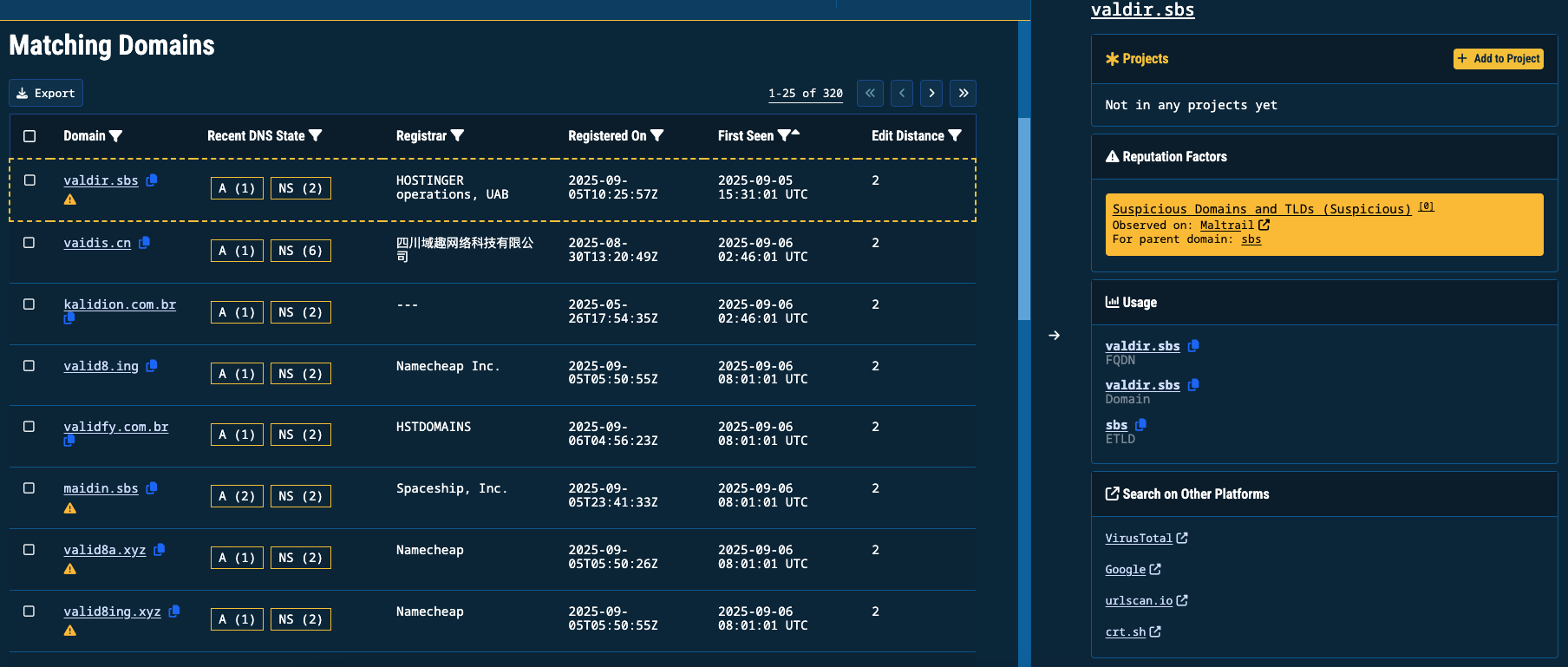
Lookalike Search results set
Matching Domains
The Matching Domains table lists domains that closely resemble your search input:
| Column | Description |
|---|---|
| Domain | The detected lookalike domain |
| Recent DNS State | Newly observed DNS resource records (for example: A, NS, AAAA) |
| Registrar | Organization responsible for domain registration |
| Registered On | When the domain was recorded as registered |
| First Seen | When Validin first observed the domain |
| Edit Distance | Similarity score to the search term (lower = closer match) |
Investigate recent activity
Select any value in Recent DNS State (for example: A (1) or NS (2)) to open a DNS record detail slide-out panel.
This panel lists the specific records seen for the domain:
- A records show the IPv4 address where the domain resolves
- AAAA records show IPv6 hosting
- NS records reveal the authoritative name servers
The number shown in parentheses (for example: A (2)) indicates that multiple observations are available. Select the record to review each observation.
Locate parked domainsUse Recent DNS State to quickly determine whether the lookalike is actively hosted or simply registered and parked.
Investigate a domain indicator
- Click on a hyperlinked indicator to execute a Core Search.
- Click anywhere in the result to open its indicator panel.
This view includes:
- Reputation Factors: Evidence of threat activity such as suspicious classification or malware sightings
- Usage: How the indicator has been observed (for example: FQDN, Domain, eTLD)
- Search on Other Platforms: Links to enrichment sources such as VirusTotal, Google, urlscan.io, and crt.sh
Exporting results
You can export results for investigation, reporting, or offline analysis.
- Select Export at the top of the table
- Under Data Format, choose:
- JSON
- CSV
- Under Data to Export, choose one of the below options:
- Export Current Page downloads only the visible results
- Export All Entries downloads all matching domains across pages
- Export with Selected Filters applies your active filters to the export
- Select Download to save the file
Updated 11 months ago